DAQiFi MCP Server · io.github.daqifi/daqifi-mcp · MIT · .NET
Discover, configure and read a DAQ from an AI agent
Daqifi.Mcp is an open-source Model Context Protocol (MCP) server for DAQiFi Nyquist data-acquisition (DAQ) hardware. Add it to Claude, Cursor, Codex or any MCP client, connect a Nyquist over USB or WiFi, and describe the measurement. The agent finds the device, sets channels and sample rate, reads the data back, and reasons about it in the same conversation.
What a session looks like
An illustrative exchange with a Nyquist on USB. The agent chooses the tools, and every call it makes is shown in the conversation as it runs, so the steps behind an answer are never hidden.
You: Capture two seconds off channels 0–3 and tell me if anything looks noisy.
discover_devices
connect_device → deviceId from discover_devices
configure_analog_channels → enabledChannels = [0, 1, 2, 3]
set_sample_rate → rateHz = 1000
capture_samples → durationMs = 2000, maxRows = 500
Agent: Channels 0, 1 and 3 are flat to within a few millivolts over the whole capture. Channel 2 carries a 60 Hz component at roughly 40 mV peak-to-peak, which points at a grounding or shielding problem on that input rather than at the signal itself.
What the server can do
Daqifi.Mcp is a thin layer over the open-source Daqifi.Core .NET library, so every tool talks to the device the same way the DAQiFi desktop software does. The tools group into six jobs.
Discover and connect
Finds Nyquist devices on USB/serial and WiFi and connects to any of them by ID. Several devices can be open at once, and every later call names the device it acts on.
Configure channels and rate
Enables exactly the analog and digital channels you name and sets the sample rate in Hz. The rate ceiling depends on how many channels are enabled, and a request above it is rejected rather than silently lowered.
Read live data
Returns the latest value on every enabled channel with its timestamp, or a block of samples as rows: one per sample tick, one column per channel. Captures are bounded by duration and row count so the result stays inside the conversation.
Log to the SD card
Starts and stops on-device logging at full rate, lists the files on the card, reports free space, and downloads a log parsed to CSV. The device records unattended; the agent collects the file later.
Drive outputs
Sets digital lines high or low, runs PWM from 6 Hz to 50 kHz at 1 to 100 % duty, and on Nyquist 3 drives the DAC outputs. Voltages are range-checked before they are sent, and several channels can be latched to change together.
Report its own version
Announces its version in the MCP handshake and checks NuGet once at startup for a newer release. The tool list grows with each release, so the agent can tell an out-of-date install from a hardware limit.
Why put an AI agent on your DAQ
A DAQ is only useful once someone has configured it, captured the data and looked at it. An agent that can do all three from a sentence changes who can run a measurement and how much of the work is recorded.
Tests without a software project
A bench technician describes the test in a sentence. No LabVIEW seat, no driver install, no capture script to maintain. The same prompt runs the same test next month, on the same or a different Nyquist.
Spot checks during bring-up
Ask what is on AI1 right now, or whether a supply rail is noisy, without stopping to write a capture script. The answer comes back with the samples behind it.
Analysis without an export
Captured rows return to the agent that asked for them. Averaging, comparing channels, spotting a 60 Hz component or flagging a dropout happens in the next sentence rather than after an export.
A record of how data was taken
The prompt, the tool calls and the returned rows sit in one transcript. Channel set, sample rate and duration are recorded alongside the result instead of in a notebook margin.
Instrumentation for teaching
Students get from “measure this” to data without first learning a driver API, and the tool calls the agent makes stay visible, so discovery, configuration and sampling remain in view rather than behind a button.
An open standard, not a plug-in
MCP is an open protocol. The same server works with Claude Desktop, Claude Code, Cursor and Codex, and any agent framework that speaks MCP can put a Nyquist inside a larger automated procedure.
Get started
1. Install the server
dotnet tool install -g Daqifi.McpRequires the .NET runtime and provides the daqifi-mcp command. With the .NET 10 SDK installed, dnx Daqifi.Mcp --yes runs the current release without installing it, which is how a client that finds the server in the MCP Registry launches it. Update later with dotnet tool update -g Daqifi.Mcp, then restart the client.
2. Point your MCP client at it
A stdio MCP server is a command the client launches as a subprocess, so every client configuration reduces to a command plus arguments.
Claude Code
claude mcp add daqifi -- daqifi-mcpClaude Desktop and Cursor
claude_desktop_config.json or ~/.cursor/mcp.json:
{
  "mcpServers": {
    "daqifi": { "command": "daqifi-mcp", "args": [] }
  }
}
Codex CLI
~/.codex/config.toml:
[mcp_servers.daqifi]
command = "daqifi-mcp"
args = []
Optional flags
--read-onlyexposes discovery and reading only.--max-sample-rate-hz <n>caps the rate an agent can request.--no-version-checkskips the startup check against nuget.org.
3. Connect a Nyquist and ask
Plug the device in over USB or join its WiFi network. SD-card logging needs the USB connection, since the card and the WiFi radio share a bus. Then ask in your own words, for example:
- “Discover my DAQiFi, connect, enable analog channels 0–3 at 1 kHz, and start logging to the SD card.”
- “Stop the log, then download it and tell me the average on AI0.”
- “What voltage is on AI1 right now?”
- “Set digital channel 3 to output and drive it high, then read AI0 for one second.”
Runs on your machine, with guardrails
The server runs locally and talks to the device exactly as the Daqifi.Core library does. Measurement, device and configuration data never leave the machine. The one outbound request is a startup version check against nuget.org, which sends nothing but a user agent, times out after five seconds, and is disabled by --no-version-check.
- Read-only mode. With
--read-only, channel and rate configuration, digital, PWM and analog outputs, logging control and SD-card deletion are refused, and the refusal says why. Listing and downloading existing logs still works. - Rejected, not degraded. A sample rate above the ceiling, a DAC voltage outside the channel’s range, or analog output on a board without it is refused outright rather than silently applied as something else.
- Existing sessions left alone. Live reads start the device’s stream only if nothing is streaming and stop it again afterwards. A session that was already running is read and left as it was.
- Every call is visible. The agent’s tool calls and their results appear in the conversation, so the person at the bench can see exactly what was sent to the hardware.
Works with every Nyquist
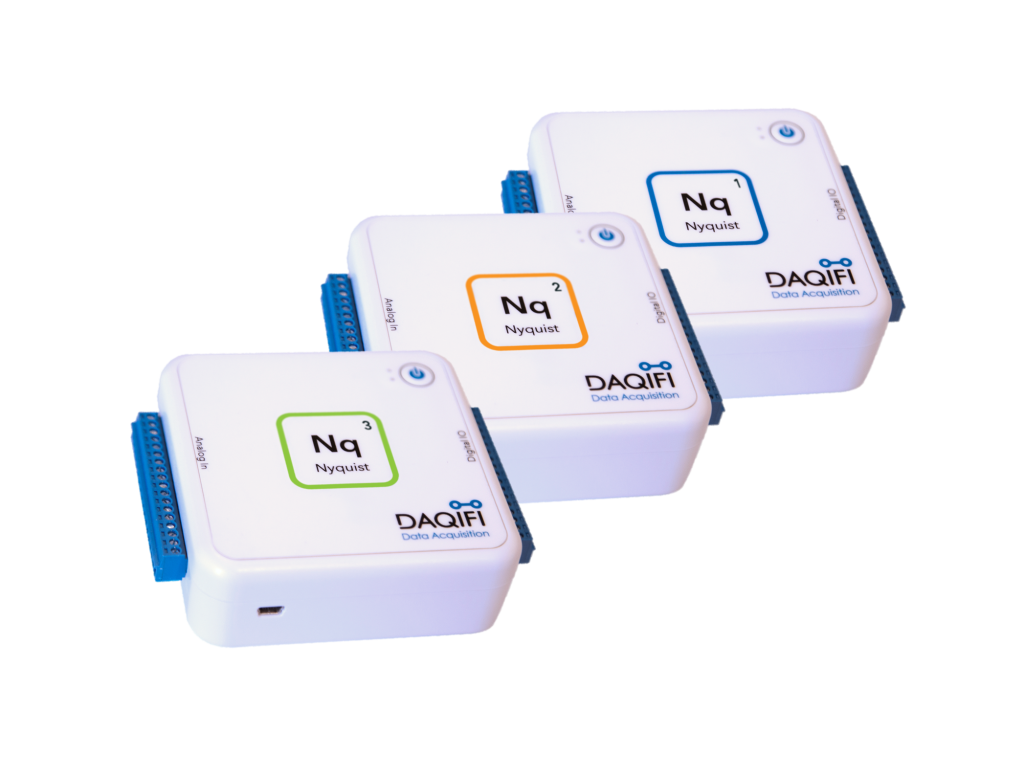
One server, three devices. Channel counts and ranges come from the device’s own capability document, and the analog-output tools are available on Nyquist 3.
Nyquist 1
16 analog inputs, 12-bit, 0–5 V, up to 19,250 Hz on a single channel. 16 digital I/O with PWM. WiFi, USB and MicroSD logging.
Nyquist 2
16 analog inputs, 24-bit (AD7173), 0–5 V. 16 digital I/O with PWM. WiFi, USB and MicroSD logging.
Nyquist 3
8 analog inputs, 18-bit, ±10 V (AD7609), sampled simultaneously. 8 analog outputs, 0–10 V (DAC7718), drivable from the agent. 16 digital I/O with PWM.
Open source, like the rest of the stack
Daqifi.Mcp lives in the daqifi-core repository under the MIT license, next to the .NET SDK it is built on. It is published to NuGet as Daqifi.Mcp and listed in the official MCP Registry as io.github.daqifi/daqifi-mcp. Issues and pull requests are welcome.
NuGet package · MCP Registry listing · All DAQiFi software · The open-source stack · Get a Nyquist